
ggNetView: An R Package for Reproducible Biological Network Analysis and Visualization. It provides flexible and publication-ready tools for exploring complex biological and ecological networks.
Installation
ggNetView depends on a number of CRAN packages. We recommend installing the required dependencies first, and then installing ggNetView from GitHub.
Current development release: v0.2.1
Step1: install CRAN dependencies
cran_pkgs <- c(
  "boot", "dplyr", "FNN", "future", "future.apply",
  "ggforce", "ggnewscale", "ggplot2", "ggraph", "ggrepel",
  "Hmisc", "huge", "igraph", "magrittr", "MASS",
  "Matrix", "patchwork", "progressr", "psych", "purrr",
  "qgraph", "Rcpp", "RcppArmadillo", "readr", "rlang",
  "scales", "scatterpie", "stringr", "tibble", "tidygraph",
  "tidyr", "vegan", "VGAM", "WGCNA"
)

new_pkgs <- cran_pkgs[!cran_pkgs %in% installed.packages()[, "Package"]]
if (length(new_pkgs)) install.packages(new_pkgs)Example1: Co-expression Network
Step1: load ggNetView
library(ggplot2)
library(ggnewscale)
library(ggNetView)
#>
#>                                                ░██               ░██
#>                                                ░██
#>  ░████████  ░████████ ░████████   ░███████  ░████████ ░██    ░██ ░██ ░███████  ░██    ░██    ░██
#> ░██    ░██ ░██    ░██ ░██    ░██ ░██    ░██    ░██    ░██    ░██ ░██░██    ░██ ░██    ░██    ░██
#> ░██    ░██ ░██    ░██ ░██    ░██ ░█████████    ░██     ░██  ░██  ░██░█████████  ░██  ░████  ░██
#> ░██   ░███ ░██   ░███ ░██    ░██ ░██           ░██      ░██░██   ░██░██          ░██░██ ░██░██
#>  ░█████░██  ░█████░██ ░██    ░██  ░███████      ░████    ░███    ░██ ░███████     ░███   ░███
#>        ░██        ░██
#>  ░███████   ░███████
#>
#>
#> ggNetView: Reproducible and Deterministic Network Analysis and Visualization
#> Version: 0.2.1
#>
#>   Authors:     Yue Liu, Chao Wang
#>   Maintainer:  Yue Liu <yueliu@iae.ac.cn>
#>
#>   Manual:      https://jiawang1209.github.io/ggNetView-manual/
#>   GitHub:      https://github.com/Jiawang1209/ggNetView
#>   Bug Reports: https://github.com/Jiawang1209/ggNetView/issues
#>
#>   Type citation('ggNetView') for how to cite this package.
Step2: load Data
You can load raw matrix
data("otu_tab")          # raw OTU/feature count matrix (features x samples)
otu_tab[1:5, 1:5]        # peek at the first 5 rows/cols
#>        KO1  KO2  KO3  KO4  KO5
#> ASV_1 1113 1968  816 1372 1062
#> ASV_2 1922 1227 2355 2218 2885
#> ASV_3  568  460  899  902 1226
#> ASV_4 1433  400  535  759 1287
#> ASV_6  882  673  819  888 1475
You can load rarely matrix. Note : the rownames of
otu_rareis the features.
data("otu_rare")         # rarefied count matrix; rownames = features
otu_tab[1:5, 1:5]        # peek at the first 5 rows/cols
#>        KO1  KO2  KO3  KO4  KO5
#> ASV_1 1113 1968  816 1372 1062
#> ASV_2 1922 1227 2355 2218 2885
#> ASV_3  568  460  899  902 1226
#> ASV_4 1433  400  535  759 1287
#> ASV_6  882  673  819  888 1475
data("otu_rare_relative")        # rarefied + relative-abundance matrix (features x samples)
otu_rare_relative[1:5, 1:5]      # peek at the first 5 rows/cols
#>              KO1        KO2        KO3        KO4        KO5
#> ASV_1 0.03306667 0.05453333 0.02013333 0.03613333 0.02686667
#> ASV_2 0.05750000 0.03393333 0.06046667 0.05810000 0.07320000
#> ASV_3 0.01733333 0.01296667 0.02290000 0.02336667 0.03106667
#> ASV_4 0.04266667 0.01093333 0.01416667 0.01933333 0.03346667
#> ASV_6 0.02646667 0.01856667 0.02110000 0.02353333 0.03806667
You can load node annotation. Note : the rownames of
tax_tabis NULL.
data("tax_tab")          # node (taxonomy) annotation table; rownames = NULL
tax_tab[1:5, 1:5]        # peek at the first 5 rows/cols
#> # A tibble: 5 × 5
#>   OTUID  Kingdom  Phylum          Class          Order
#>   <chr>  <chr>    <chr>           <chr>          <chr>
#> 1 ASV_2  Archaea  Thaumarchaeota  Unassigned     Nitrososphaerales
#> 2 ASV_3  Bacteria Verrucomicrobia Spartobacteria Unassigned
#> 3 ASV_31 Bacteria Actinobacteria  Actinobacteria Actinomycetales
#> 4 ASV_27 Archaea  Thaumarchaeota  Unassigned     Nitrososphaerales
#> 5 ASV_9  Bacteria Unassigned      Unassigned     Unassigned
Step3: create graph object
obj <- build_graph_from_mat(
  mat = otu_rare_relative,    # variables x samples abundance matrix
  transfrom.method = "none",  # pre-correlation transform; "none" = keep as-is
  method = "WGCNA",           # correlation backend: WGCNA::corAndPvalue
  cor.method = "pearson",     # Pearson correlation
  proc = "BH",                # multiple-testing correction (Benjamini-Hochberg)
  r.threshold = 0.7,          # |r| cutoff for keeping an edge
  p.threshold = 0.05,         # adjusted p-value cutoff
  node_annotation = tax_tab   # taxonomy joined onto each node by name
)

obj                           # tbl_graph with Modularity / Degree / Strength + taxonomy
#> # A tbl_graph: 1951 nodes and 8732 edges
#> #
#> # An undirected simple graph with 120 components
#> #
#> # Node Data: 1,951 × 14 (active)
#>    name    modularity modularity2 modularity3 Modularity Degree Strength Kingdom
#>    <chr>   <fct>      <ord>       <chr>       <ord>       <dbl>    <dbl> <chr>
#>  1 ASV_916 1          1           1           1              57     49.7 Bacter…
#>  2 ASV_777 1          1           1           1              55     46.4 Bacter…
#>  3 ASV_23… 1          1           1           1              53     46.6 Bacter…
#>  4 ASV_606 1          1           1           1              51     42.7 Bacter…
#>  5 ASV_740 1          1           1           1              51     44.9 Bacter…
#>  6 ASV_15… 1          1           1           1              50     43.8 Bacter…
#>  7 ASV_568 1          1           1           1              49     43.6 Bacter…
#>  8 ASV_671 1          1           1           1              49     43.7 Bacter…
#>  9 ASV_664 1          1           1           1              49     42.9 Bacter…
#> 10 ASV_10… 1          1           1           1              49     43.6 Bacter…
#> # ℹ 1,941 more rows
#> # ℹ 6 more variables: Phylum <chr>, Class <chr>, Order <chr>, Family <chr>,
#> #   Genus <chr>, Species <chr>
#> #
#> # Edge Data: 8,732 × 5
#>    from    to weight correlation corr_direction
#>   <int> <int>  <dbl>       <dbl> <chr>
#> 1  1656  1703  0.793       0.793 Positive
#> 2   782   787  0.895       0.895 Positive
#> 3   395   787  0.864       0.864 Positive
#> # ℹ 8,729 more rows
Step4: ggNetView to plot
Basic network plot
p1 <- ggNetView(
  graph_obj = obj,              # tbl_graph from build_graph_from_mat()
  layout = "gephi",             # node-positioning algorithm
  layout_module = "adjacent",   # place neighbouring modules close together
  group_by = "Modularity",      # node attribute used to define groups/modules
  node_fill = "Modularity",     # node attribute mapped to point fill
  node_size_range = c(1, 5),    # min/max node size range
  center = F,                   # do NOT pull nodes toward each module centre
  node_jitter = F,              # no positional jitter
  shrink = 0.9,                 # shrink layout inward (smaller = more compact)
  edge_alpha = 0.2,             # edge transparency
  edge_color = "#d9d9d9"        # edge colour
)

p1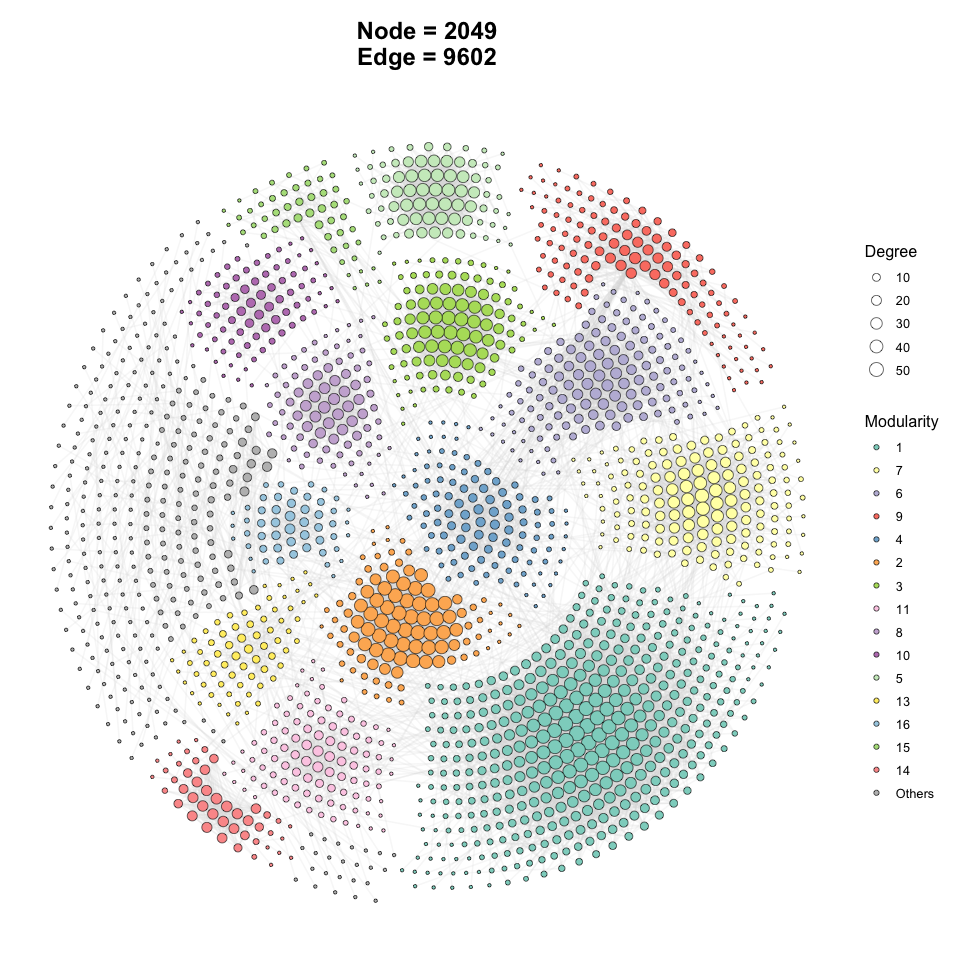
Add outer line in netwotk plot
p2 <- ggNetView(
  graph_obj = obj,              # tbl_graph from build_graph_from_mat()
  layout = "gephi",             # node-positioning algorithm
  layout_module = "adjacent",   # place neighbouring modules close together
  group_by = "Modularity",      # node attribute used to define groups/modules
  node_fill = "Modularity",     # node attribute mapped to point fill
  node_size_range = c(1, 5),    # min/max node size range
  center = F,                   # do NOT pull nodes toward each module centre
  node_jitter = TRUE,           # jitter node positions to reduce overlap
  node_jitter_sd = 0.15,        # SD of the jitter (bigger -> more spread)
  edge_color = "corr_direction", # colour edges by correlation sign
  shrink = 0.9,                 # shrink layout inward (smaller = more compact)
  edge_alpha = 0.2,             # edge transparency
  module_outline = T,           # draw an outer hull/line around each module
  module_label = T              # show node labels
)

p2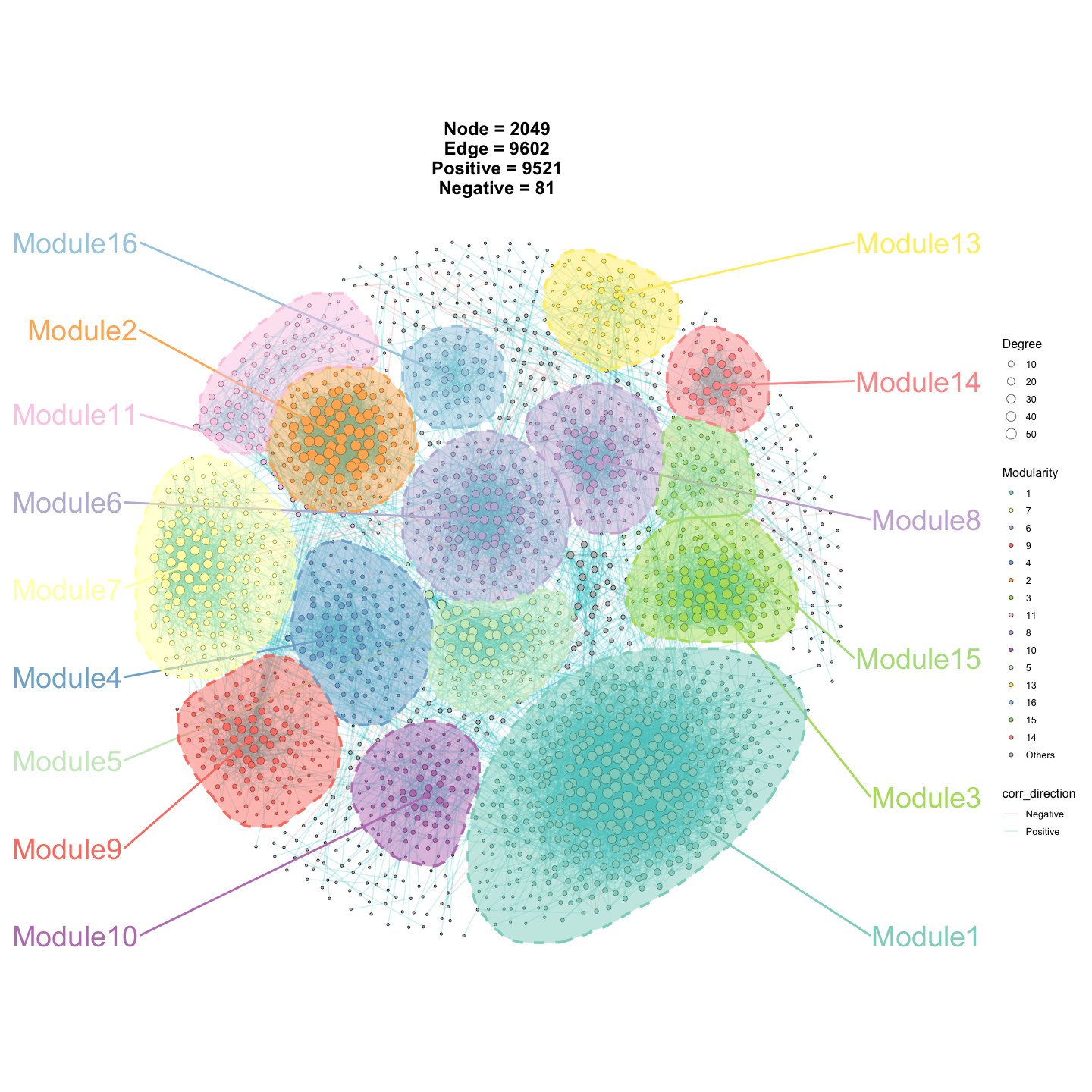
Change the fill of node points.
p3 <- ggNetView(
  graph_obj = obj,              # tbl_graph from build_graph_from_mat()
  layout = "gephi",             # node-positioning algorithm
  layout_module = "adjacent",   # place neighbouring modules close together
  group_by = "Modularity",      # group nodes by module
  node_fill = "Phylum",         # map point fill to taxonomy (Phylum) instead of module
  node_size_range = c(1, 5),    # min/max node size range
  center = F,                   # do NOT pull nodes toward each module centre
  node_jitter = TRUE,           # jitter node positions to reduce overlap
  node_jitter_sd = 0.15,        # SD of the jitter
  edge_color = "corr_direction", # colour edges by correlation sign
  shrink = 0.9,                 # shrink layout inward
  edge_alpha = 0.2,             # edge transparency
  module_outline = T,           # draw an outer hull/line around each module
  module_label = T              # show node labels
)

p3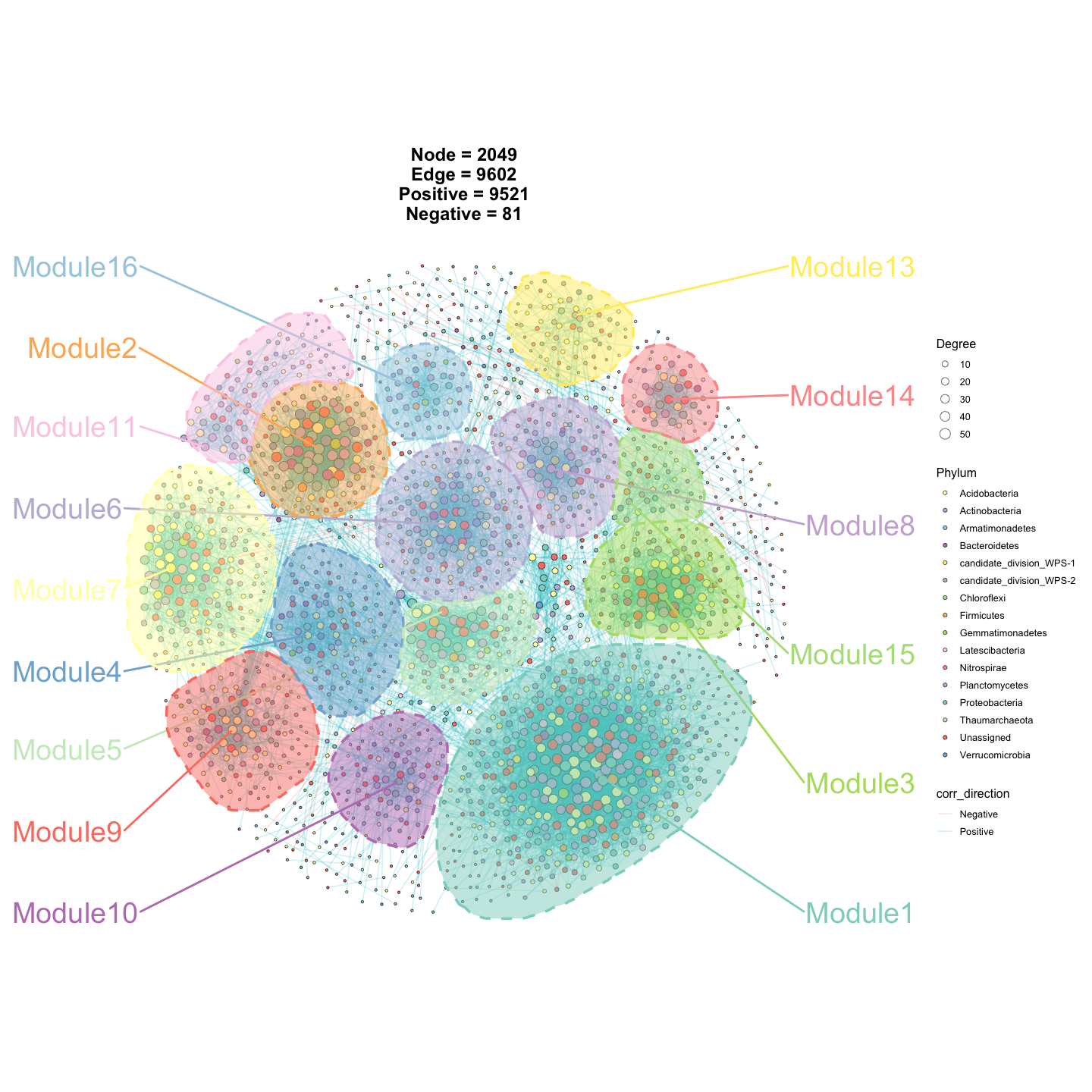
Change the color of node points.
p4 <- ggNetView(
  graph_obj = obj,              # tbl_graph from build_graph_from_mat()
  layout = "gephi",             # node-positioning algorithm
  layout_module = "adjacent",   # place neighbouring modules close together
  group_by = "Modularity",      # group nodes by module
  node_fill = "Phylum",         # map point fill to taxonomy (Phylum)
  node_color = "Phylum",        # map point border colour to taxonomy (Phylum)
  node_size_range = c(1, 5),    # min/max node size range
  center = F,                   # do NOT pull nodes toward each module centre
  node_jitter = TRUE,           # jitter node positions to reduce overlap
  node_jitter_sd = 0.15,        # SD of the jitter
  edge_color = "corr_direction", # colour edges by correlation sign
  shrink = 0.9,                 # shrink layout inward
  edge_alpha = 0.2,             # edge transparency
  module_outline = T,           # draw an outer hull/line around each module
  module_label = T              # show node labels
)

p4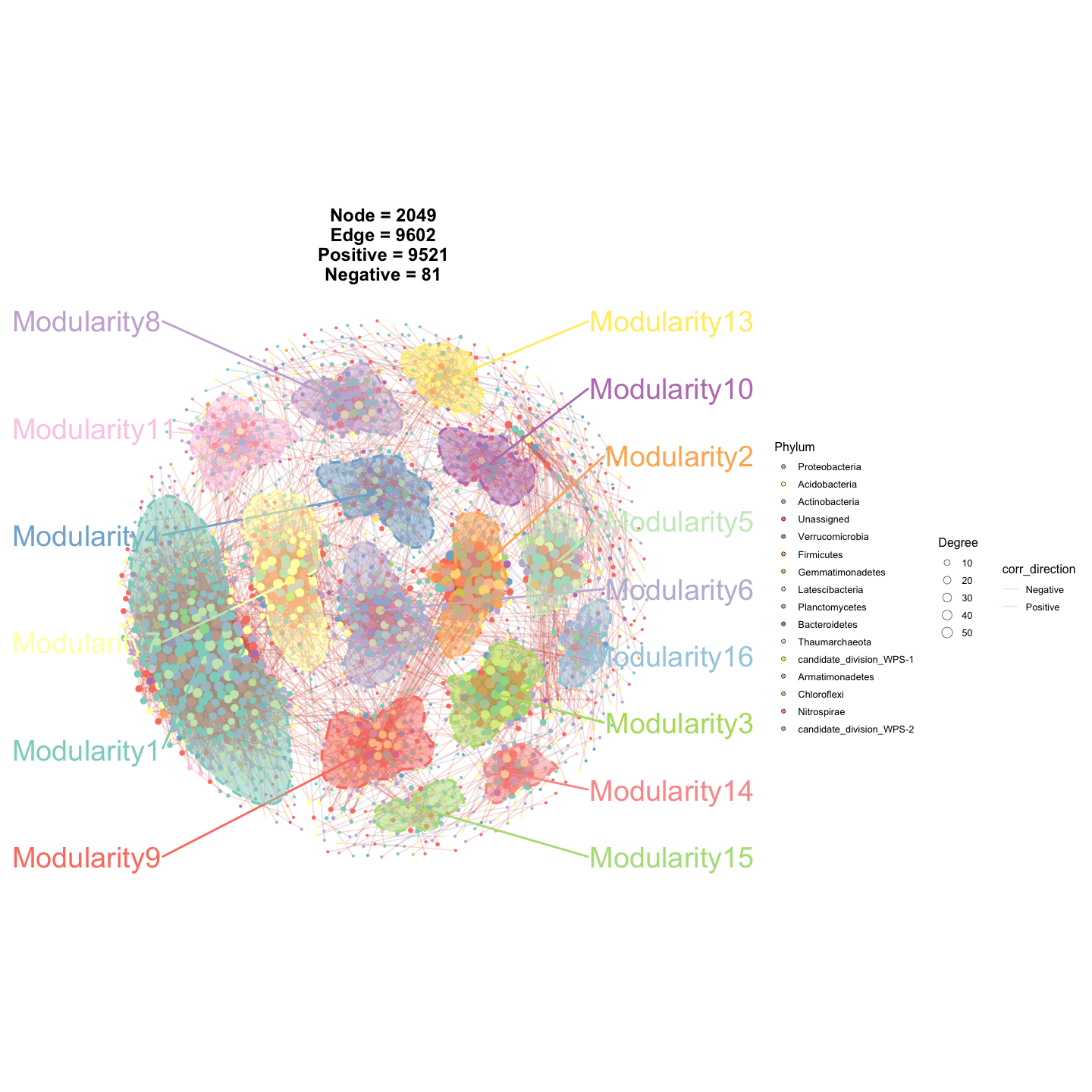
Add node label
p5 <- ggNetView(
  graph_obj = obj,              # tbl_graph from build_graph_from_mat()
  layout = "gephi",             # node-positioning algorithm
  layout_module = "adjacent",   # place neighbouring modules close together
  group_by = "Modularity",      # group nodes by module
  node_fill = "Modularity",     # map point fill to module
  node_size_range = c(1, 5),    # min/max node size range
  center = F,                   # do NOT pull nodes toward each module centre
  node_jitter = TRUE,           # jitter node positions to reduce overlap
  node_jitter_sd = 0.15,        # SD of the jitter
  edge_color = "corr_direction", # colour edges by correlation sign
  shrink = 0.9,                 # shrink layout inward
  edge_alpha = 0.2,             # edge transparency
  module_outline = T,           # draw an outer hull/line around each module
  module_label = T,             # show node labels
  node_label = "top1"           # label only the top-1 hub node per module
)

p5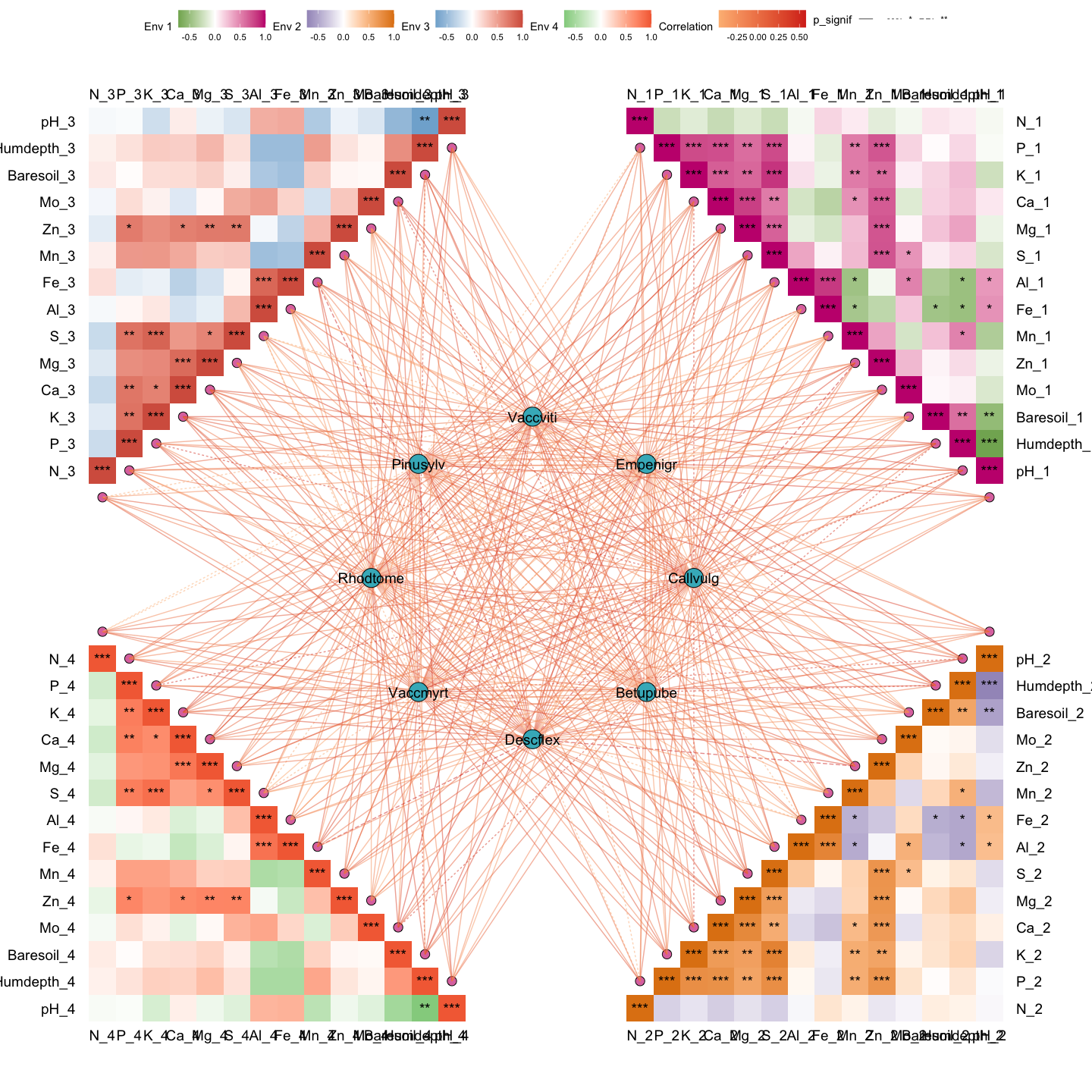
Save Plot
Example2: Subgraph
Get information of graph_object
Sub_module_1 <- get_subgraph(
  graph_obj = obj,        # full tbl_graph object
  select_module = "1"     # extract the subgraph for module "1"
)
#>    Module Number
#> 1       1    357
#> 2       4    268
#> 3       3    142
#> 4       6    124
#> 5       2     96
#> 6       5     96
#> 7       7     91
#> 8       9     80
#> 9       8     78
#> 10     12     68
#> 11     10     67
#> 12     14     52
#> 13     15     50
#> 14     13     37
#> 15     11     34
#> 16 Others    311

names(Sub_module_1)       # components returned for the selected module
#> [1] "sub_graph_all"    "stat_module"      "sub_graph_select"
Example3: Mantel-test with environment
# load test data in ggNetView
data("Envdf_4st")   # environmental factor table (samples x env variables)
data("Spedf")       # species/community table (samples x taxa)
out1 <- gglink_heatmaps(
  env = Envdf_4st,                  # environmental data frame
  spec = Spedf,                     # species/community data frame
  env_select = list(Env01 = 1:14,   # group env columns into blocks:  Env01 = cols 1-14
                    Env02 = 15:28,  #                                 Env02 = cols 15-28
                    Env03 = 29:42,  #                                 Env03 = cols 29-42
                    Env04 = 43:56), #                                 Env04 = cols 43-56
  spec_select = list(Spec01 = 1:8), # species block: Spec01 = cols 1-8
  relation_method = "correlation",  # env-spec association via correlation (vs "mantel")
  spec_layout = "circle_outline",   # arrange species heatmap as a circular outline
  cor.method = "pearson",           # Pearson correlation
  cor.use = "pairwise",             # pairwise-complete handling of missing values
  r = 6,                            # radius of the circular layout
  distance = 1,                     # spacing between heatmap blocks
  orientation = c("top_right", "bottom_right", "top_left", "bottom_left")  # placement of each env block
)
#> The max module in network is 2 we use the 2  modules for next analysis

out1[[1]]                           # first plot in the returned list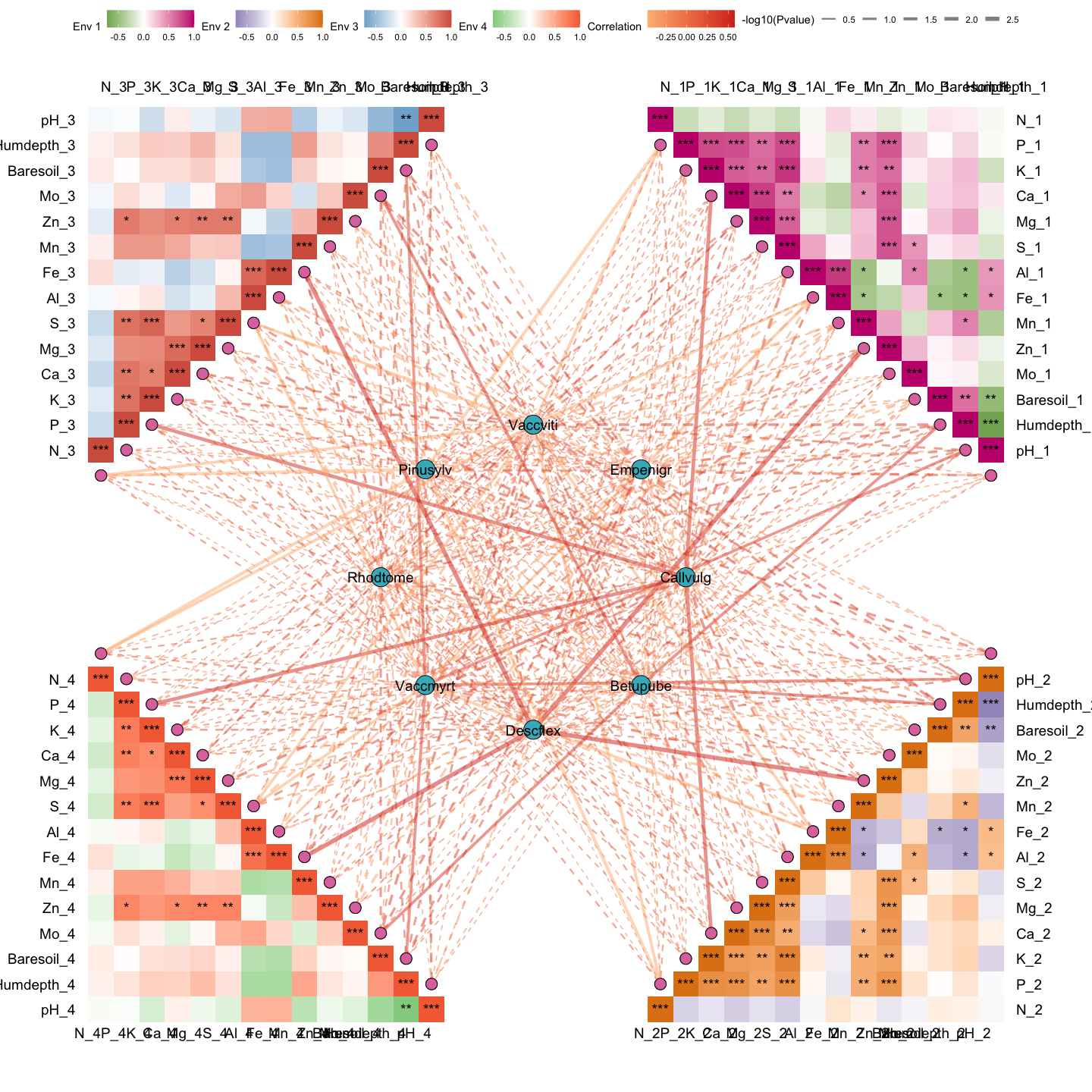
Example4: Mantel-test with environment
Leave lines with a significance level less than 0.05, and change the color of heatmap.
out2 <- gglink_heatmaps(
  env = Envdf_4st,                  # environmental data frame
  spec = Spedf,                     # species/community data frame
  env_select = list(Env01 = 1:14,   # env block Env01 = cols 1-14
                    Env03 = 29:40,  #           Env03 = cols 29-40
                    Env04 = 43:50), #           Env04 = cols 43-50
  spec_select = list(Spec01 = 1:8), # species block: Spec01 = cols 1-8
  relation_method = "correlation",  # association via correlation
  spec_layout = "circle_outline",   # circular outline layout for species heatmap
  cor.method = "pearson",           # Pearson correlation
  cor.use = "pairwise",             # pairwise-complete handling of missing values
  drop_nonsig = TRUE,               # keep only links with p < 0.05 (drop non-significant)
  HeatmapColorBar = list(c("#2166ac", "#b2182b"),   # custom low->high colour ramp per env block
                         c("#1b7837", "#762a83"),
                         c("#4393c3", "#d6604d")),
  HeatmapPointFill = "#8c6bb1",     # fill colour of heatmap anchor points
  CorePointFill = "#225ea8",        # fill colour of the central/core point
  HeatmapLabelOrient = 45,          # rotate heatmap labels by 45 degrees
  r = 6,                            # radius of the circular layout
  distance = 1,                     # spacing between heatmap blocks
  orientation = c("top_right", "top_left", "bottom_left")  # placement of each env block
)
#> The max module in network is 2 we use the 2  modules for next analysis

out2[[2]]                           # second plot in the returned list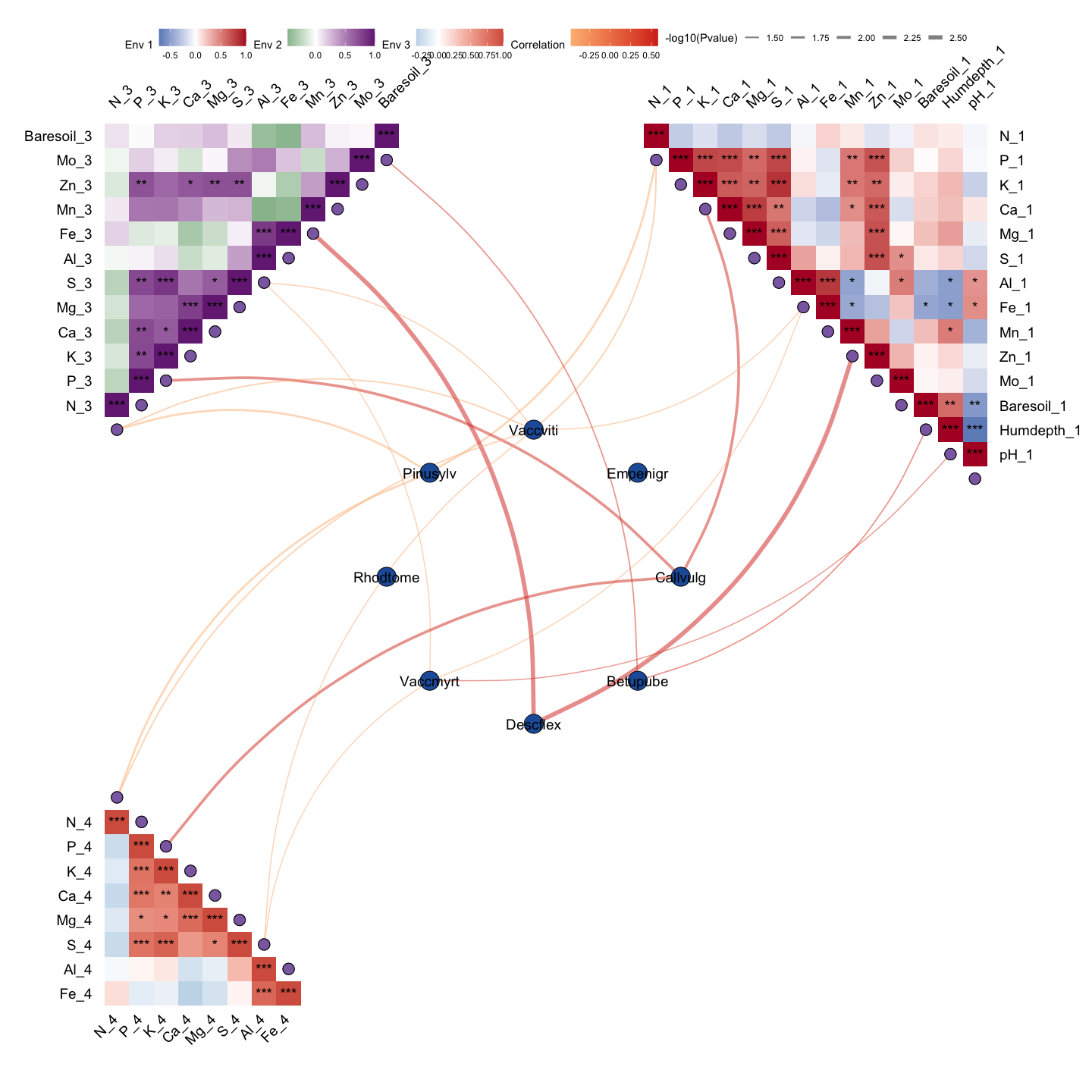
Example5: Network-environment
####----load Data----####
data("otu_rare_relative")   # rarefied relative-abundance matrix (features x samples)
data("tax_tab")             # node (taxonomy) annotation table
data("Envdf_4st_2")         # environmental factor table for the network-env analysis


####----build graph object----####
graph_obj <- build_graph_from_mat(
  mat = otu_rare_relative,       # variables x samples abundance matrix
  transfrom.method = "none",     # pre-correlation transform; "none" = keep as-is
  node_annotation = tax_tab,     # taxonomy joined onto each node by name
  p.threshold = 0.05,            # adjusted p-value cutoff
  r.threshold = 0.75,            # |r| cutoff for keeping an edge
  method = "WGCNA",              # correlation backend: WGCNA::corAndPvalue
  proc = "BH",                   # multiple-testing correction (Benjamini-Hochberg)
  module.method = "Fast_greedy", # community detection algorithm
  top_modules = 15,              # keep top-15 modules; rest -> "Others"
  seed = 1115                    # fix RNG for reproducibility
)

graph_obj                        # resulting tbl_graph
#> # A tbl_graph: 1951 nodes and 8732 edges
#> #
#> # An undirected simple graph with 120 components
#> #
#> # Node Data: 1,951 × 14 (active)
#>    name    modularity modularity2 modularity3 Modularity Degree Strength Kingdom
#>    <chr>   <fct>      <ord>       <chr>       <ord>       <dbl>    <dbl> <chr>
#>  1 ASV_916 1          1           1           1              57     49.7 Bacter…
#>  2 ASV_777 1          1           1           1              55     46.4 Bacter…
#>  3 ASV_23… 1          1           1           1              53     46.6 Bacter…
#>  4 ASV_606 1          1           1           1              51     42.7 Bacter…
#>  5 ASV_740 1          1           1           1              51     44.9 Bacter…
#>  6 ASV_15… 1          1           1           1              50     43.8 Bacter…
#>  7 ASV_568 1          1           1           1              49     43.6 Bacter…
#>  8 ASV_671 1          1           1           1              49     43.7 Bacter…
#>  9 ASV_664 1          1           1           1              49     42.9 Bacter…
#> 10 ASV_10… 1          1           1           1              49     43.6 Bacter…
#> # ℹ 1,941 more rows
#> # ℹ 6 more variables: Phylum <chr>, Class <chr>, Order <chr>, Family <chr>,
#> #   Genus <chr>, Species <chr>
#> #
#> # Edge Data: 8,732 × 5
#>    from    to weight correlation corr_direction
#>   <int> <int>  <dbl>       <dbl> <chr>
#> 1  1656  1703  0.793       0.793 Positive
#> 2   782   787  0.895       0.895 Positive
#> 3   395   787  0.864       0.864 Positive
#> # ℹ 8,729 more rows


p_sub <- ggNetView(
  graph_obj = graph_obj,        # tbl_graph object
  layout = "gephi",             # node-positioning algorithm
  center = T,                   # pull nodes toward each module centre
  layout_module = "adjacent",   # place neighbouring modules close together
  group_by = "Modularity",      # group nodes by module
  node_fill = "Modularity"      # map point fill to module
)

p_sub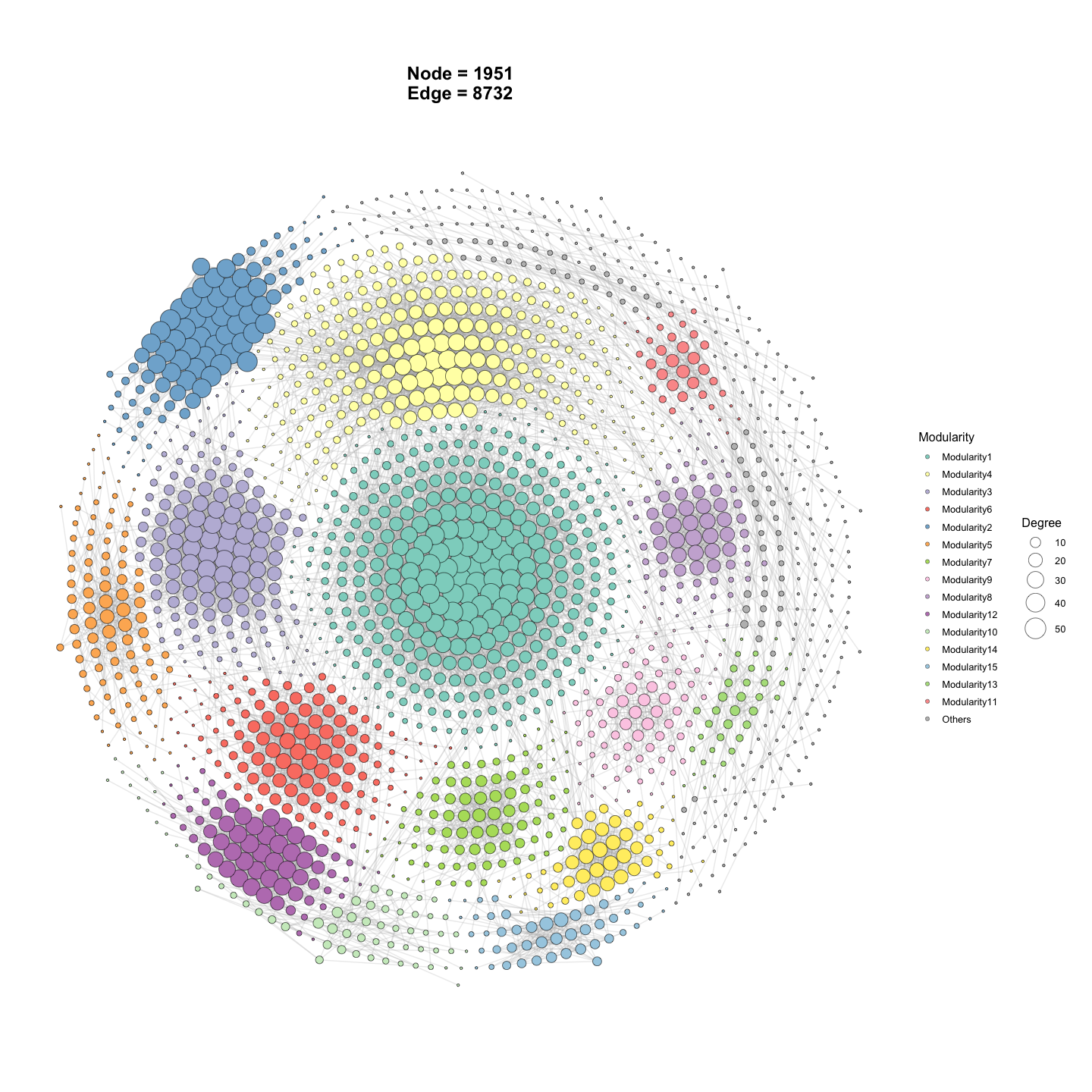
p_sub2 <- ggNetView(
  graph_obj = graph_obj,        # tbl_graph object
  layout = "gephi",             # node-positioning algorithm
  center = F,                   # do NOT pull nodes toward each module centre (compare with p_sub)
  layout_module = "adjacent",   # place neighbouring modules close together
  group_by = "Modularity",      # group nodes by module
  node_fill = "Modularity"      # map point fill to module
)

p_sub2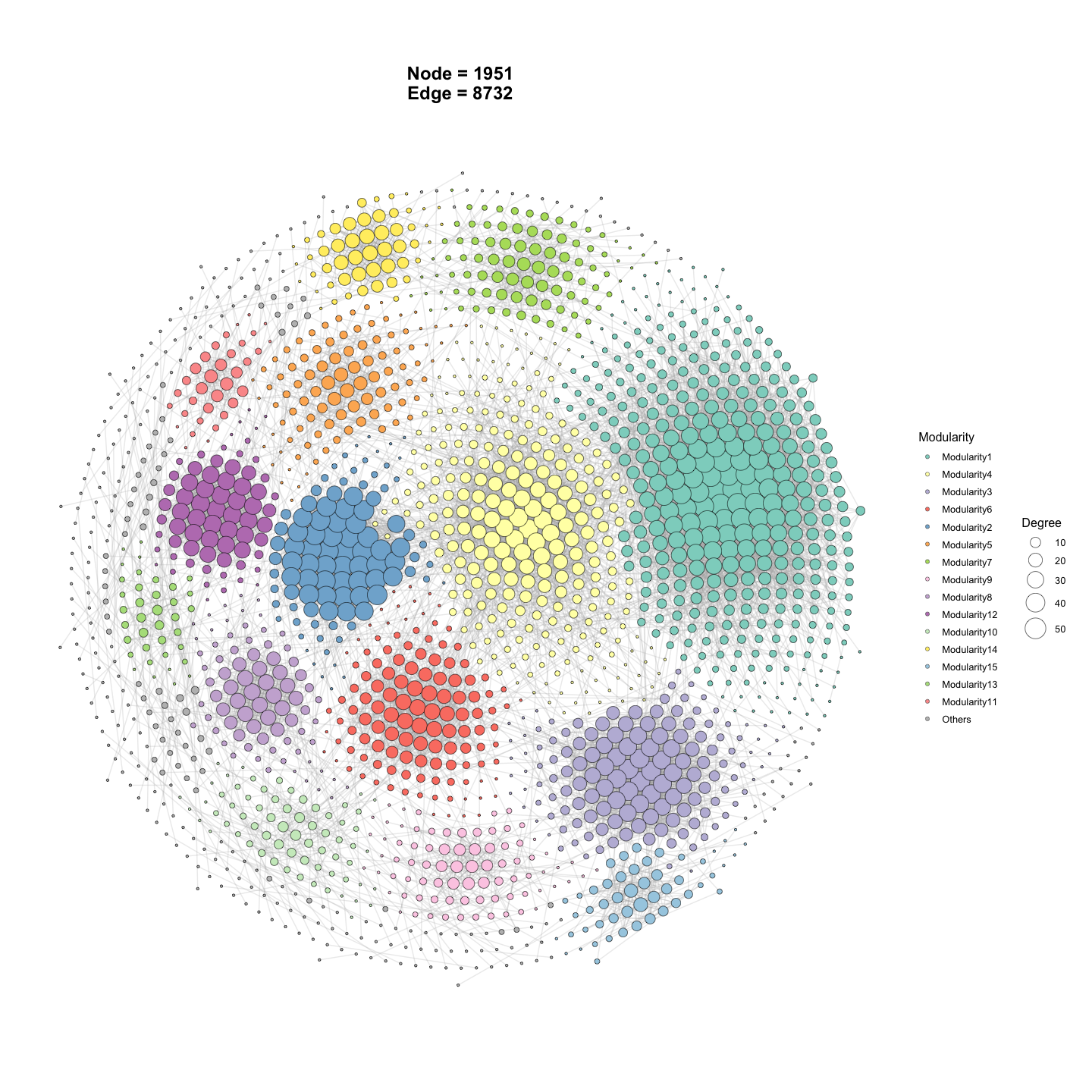
####----Network Environment PC1----####
res <- ggnetview_modularity_heatmaps(
  graph_obj,                        # network tbl_graph object
  Envdf_4st_2,                      # environmental factor table
  otu_rare_relative,                # abundance matrix (used to derive per-module index)
  env_select = list(Env01 = 1:14,   # env block Env01 = cols 1-14
                    Env02 = 15:28,   #           Env02 = cols 15-28
                    Env03 = 29:42,   #           Env03 = cols 29-42
                    Env04 = 43:56),  #           Env04 = cols 43-56
  drop_nonsig = T,                  # keep only significant module-env links
  r = 35,                           # radius of the circular heatmap layout
  distance = 5,                     # spacing between heatmap blocks
  HeatmapLabelOrient = 45,          # rotate heatmap labels by 45 degrees
  shrink = 0.65,                    # shrink the network layout inward
  module_index = "eigengene",  # 或 "abundance"   # per-module summary: eigengene (PC1)
  relation_method = "correlation",  # 或 "mantel",  # module-env association method
  HeatmapColorBar = list(           # custom low->high colour ramp per env block
    c("#2166ac", "#b2182b"),
    c("#1b7837", "#762a83"),
    c("#4393c3", "#d6604d"),
    c("#92c5de", "#f4a582")
  ),
  layout = "gephi",                 # node-positioning algorithm
  layout_module = "adjacent",       # place neighbouring modules close together
  node_jitter    = T,                       # jitter node positions to reduce overlap
  module_outline = T,                    # draw an outer hull/line around each module
  HeatmapScale = 1.5,               # scale factor for heatmap point/tile size
  network_outline = T,              # draw an outer boundary around node groups
  module_label = F,                        # do not show node labels
  # module_label_size = 5
)

res[[1]]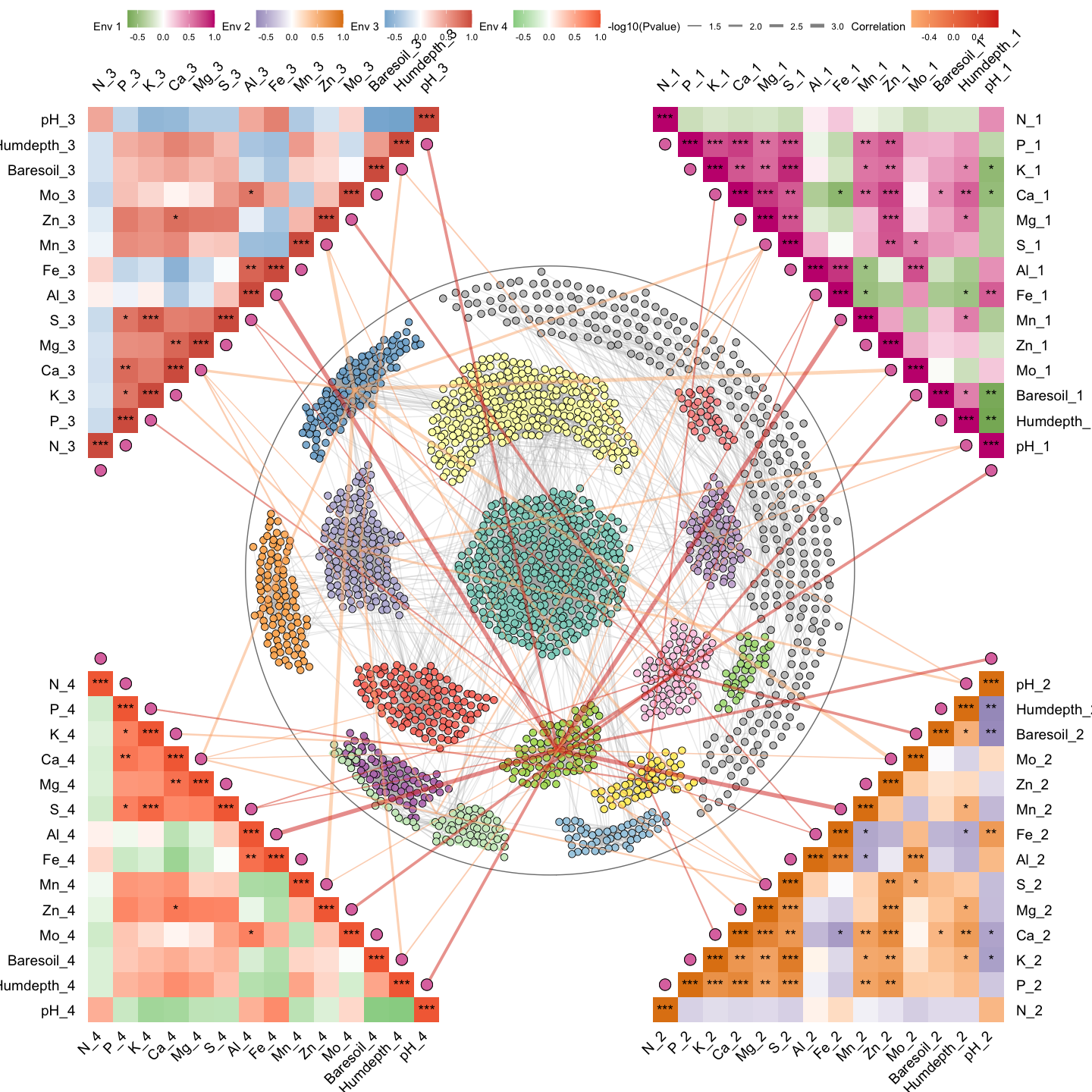
####----Network Environment abudance----####
res2 <- ggnetview_modularity_heatmaps(
  graph_obj,                        # network tbl_graph object
  Envdf_4st_2,                      # environmental factor table
  otu_rare_relative,                # abundance matrix (used to derive per-module index)
  env_select = list(Env01 = 1:14,   # env block Env01 = cols 1-14
                    Env02 = 15:28,   #           Env02 = cols 15-28
                    Env03 = 29:42,   #           Env03 = cols 29-42
                    Env04 = 43:56),  #           Env04 = cols 43-56
  drop_nonsig = T,                  # keep only significant module-env links
  r = 35,                           # radius of the circular heatmap layout
  distance = 5,                     # spacing between heatmap blocks
  HeatmapLabelOrient = 45,          # rotate heatmap labels by 45 degrees
  shrink = 0.65,                    # shrink the network layout inward
  module_index = "abundance",  # 或 "abundance"   # per-module summary: aggregated abundance
  relation_method = "mantel",  # 或 "mantel",      # module-env association via Mantel test
  HeatmapColorBar = list(           # custom low->high colour ramp per env block
    c("#2166ac", "#b2182b"),
    c("#1b7837", "#762a83"),
    c("#4393c3", "#d6604d"),
    c("#92c5de", "#f4a582")
  ),
  layout = "gephi",                 # node-positioning algorithm
  layout_module = "adjacent",       # place neighbouring modules close together
  node_jitter    = T,                       # jitter node positions to reduce overlap
  module_outline = T,                    # draw an outer hull/line around each module
  HeatmapScale = 1.5,               # scale factor for heatmap point/tile size
  network_outline = T,              # draw an outer boundary around node groups
  module_label = F,                        # do not show node labels
  # module_label_size = 5
)
#> Using `mantel_kind = "block_vs_col"`. Note: prior versions ran the equivalent of `"col_vs_col"` when `relation_method = "mantel"`. The new default is the ecologically standard `"block_vs_col"` (community matrix vs each env column). Pass `mantel_kind = "col_vs_col"` to reproduce old results.

res2[[1]]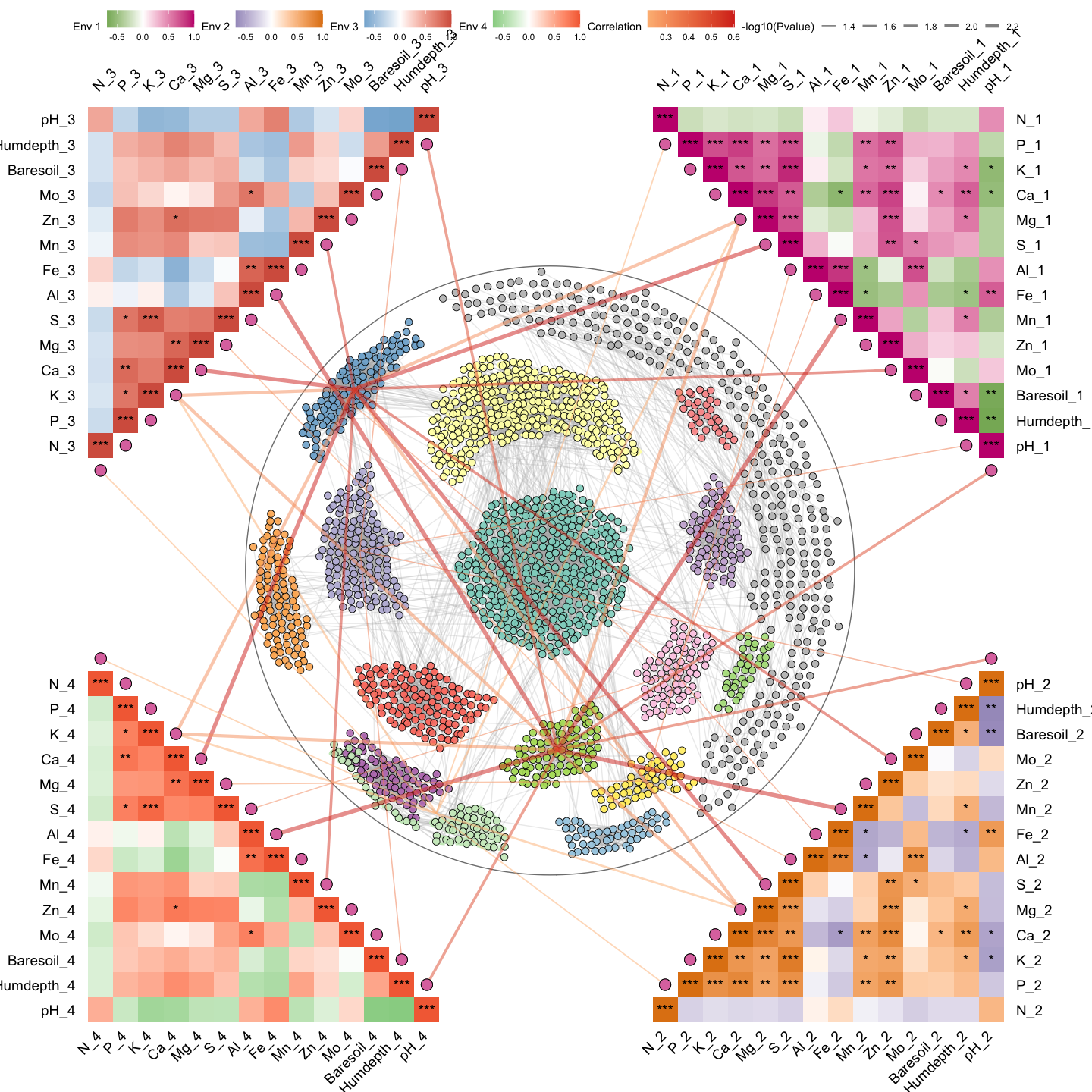
res2[[2]]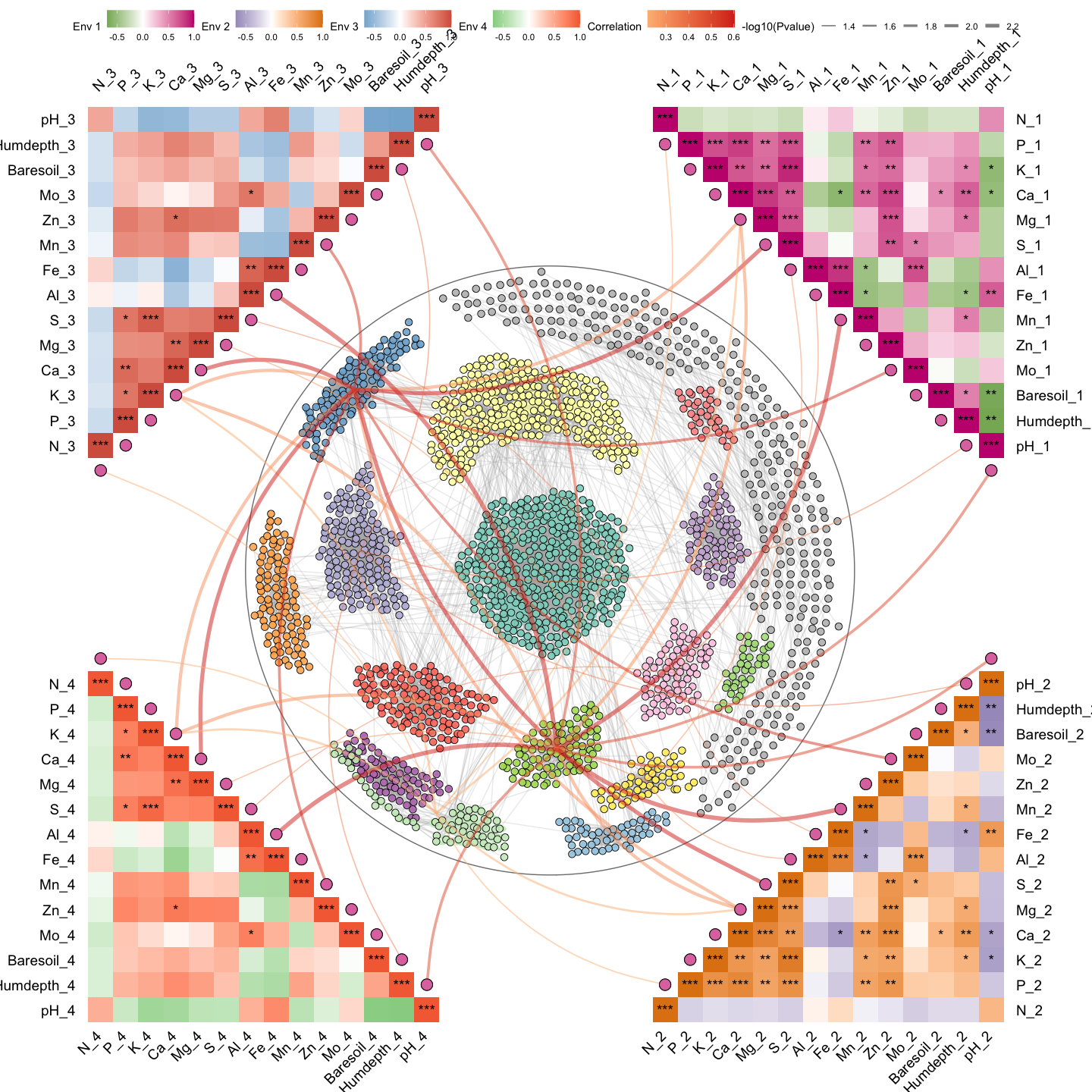
Example6: Network-compare
# ---- Multi-network "linked" view (no per-group scale normalisation) ----
# `ggNetView_multi_link()` builds ONE network per group (defined by `group_info`),
# lays each one out independently, and places all sub-networks on a circular
# anchor frame so that cross-group edges/relationships can be visually compared.
out1 <- ggNetView_multi_link(
  mat              = otu_rare_relative, # variables x samples abundance matrix
  group_info       = otu_sample,        # sample metadata; defines how samples are split into groups
  transfrom.method = "none",            # pre-correlation transform on `mat`; "none" = keep as-is
  r.threshold      = 0.7,               # |r| cutoff for keeping an edge
  p.threshold      = 0.05,              # adjusted p-value cutoff
  method           = "WGCNA",           # correlation backend: WGCNA::corAndPvalue
  cor.method       = "pearson",         # Pearson correlation
  proc             = "BH",              # multiple-testing correction (Benjamini-Hochberg)
  module.method    = "Fast_greedy",     # community detection per sub-network
  layout_module    = "adjacent",        # neighbouring modules placed close together
  center           = T,                 # pull a node toward the centre of each sub-layout
  top_modules      = 15,                # keep top-15 modules per sub-network; rest -> "Others"
  layout           = "gephi",           # global node-positioning algorithm per sub-network
  shrink           = 0.5,               # shrink each sub-network inward (smaller = more compact)
  scale            = F,                 # do NOT normalise each group to a common scale -> sub-networks keep their native size differences
  node_jitter      = T,                 # jitter node positions slightly to reduce overlap
  node_jitter_sd   = 0.3,               # SD of the jitter (bigger -> more spread)
  anchor_dist      = 30,                 # distance between groups on the outer anchor circle
  seed             = 1115,              # fix RNG for reproducibility
  orientation      = "up",              # frame orientation; one of "up"/"down"/"left"/"right"
  angle            = 0                  # additional rotation angle (degrees)
)
#> Scale for size is already present.
#> Adding another scale for size, which will replace the existing scale.
#> Scale for size is already present.
#> Adding another scale for size, which will replace the existing scale.

p1 <- out1[["p"]]   # the assembled ggplot object
p1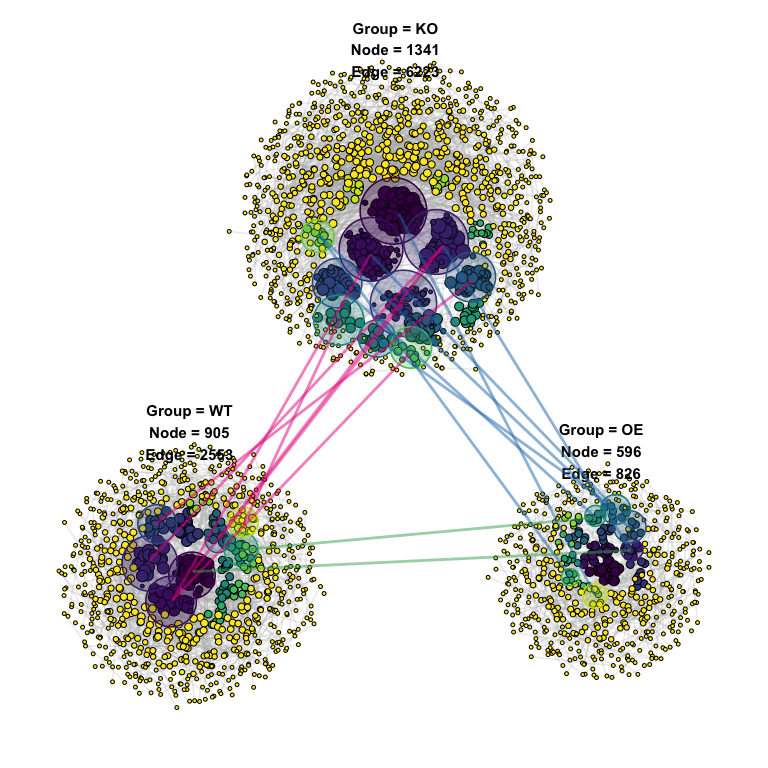
out1$info           # auxiliary table: per-group node/edge counts, module info, etc.
#> # A tibble: 18 × 11
#>    modA   modB   overlap sizeA sizeB overlap_coef  pvalue   FDR Group    GroupA
#>    <chr>  <chr>    <int> <int> <int>        <dbl>   <dbl> <dbl> <chr>    <chr>
#>  1 1      3            2    15     7        0.286 0.0307  1     KO_to_OE KO
#>  2 49     6            1     4     3        0.333 0.0333  1     KO_to_OE KO
#>  3 2      8            2    20     3        0.667 0.00867 0.984 KO_to_OE KO
#>  4 7      8            1     4     3        0.333 0.0333  1     KO_to_OE KO
#>  5 11     9            2    13     5        0.4   0.0115  0.984 KO_to_OE KO
#>  6 49     11           1     4     4        0.25  0.0443  1     KO_to_OE KO
#>  7 5      15           2    29     3        0.667 0.0182  1     KO_to_OE KO
#>  8 Others Others     179   219   276        0.817 0.00896 0.984 KO_to_OE KO
#>  9 1      55           4    28    27        0.148 0.0452  1     KO_to_WT KO
#> 10 2      2            4    30    22        0.182 0.0286  1     KO_to_WT KO
#> 11 97     2            2     8    22        0.25  0.0387  1     KO_to_WT KO
#> 12 1      1            5    28    24        0.208 0.00568 0.647 KO_to_WT KO
#> 13 4      4            2    18    11        0.182 0.0488  1     KO_to_WT KO
#> 14 3      6            2    18     8        0.25  0.0264  1     KO_to_WT KO
#> 15 8      16           2    11     7        0.286 0.00759 0.647 KO_to_WT KO
#> 16 Others Others     231   309   378        0.748 0.00660 0.647 KO_to_WT KO
#> 17 3      55           2     6    12        0.333 0.0233  1     OE_to_WT OE
#> 18 9      9            1     3     2        0.5   0.0215  1     OE_to_WT OE
#> # ℹ 1 more variable: GroupB <chr>
####----Plot2----####
# ---- Same setup but with `scale = TRUE` -> each group normalised to a common size ----
# Useful when groups have very different network sizes and you want them
# visually comparable side-by-side. With `scale = TRUE` the native size
# differences are removed, so jitter_sd is also reduced (0.01) accordingly.
out2 <- ggNetView_multi_link(
  mat              = otu_rare_relative,
  group_info       = otu_sample,
  transfrom.method = "none",
  r.threshold      = 0.7,
  p.threshold      = 0.05,
  method           = "WGCNA",
  cor.method       = "pearson",
  proc             = "BH",
  module.method    = "Fast_greedy",
  layout_module    = "adjacent",
  center           = T,
  top_modules      = 15,
  layout           = "gephi",
  shrink           = 0.5,
  scale            = T,                 # normalise each group to a comparable coordinate scale
  node_jitter      = T,
  node_jitter_sd   = 0.01,              # smaller jitter — sub-networks are already on a unified scale
  anchor_dist      = 1,
  seed             = 1115,
  orientation      = "up",
  angle            = 0
)
#> Scale for size is already present.
#> Adding another scale for size, which will replace the existing scale.
#> Scale for size is already present.
#> Adding another scale for size, which will replace the existing scale.


p2 <- out2[["p"]]
p2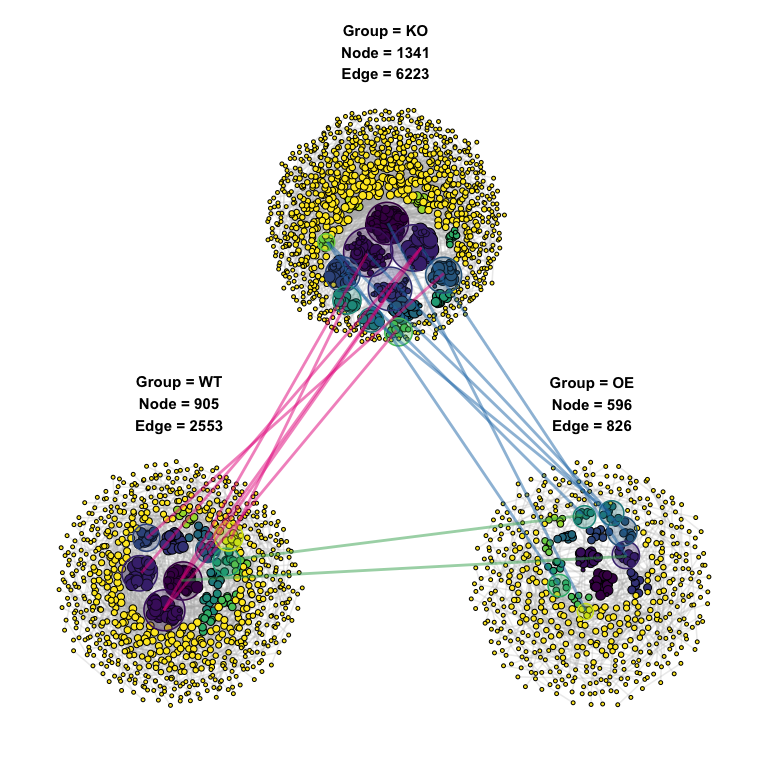
Example7: Network-topology
# ---- Build a co-occurrence network from an abundance matrix ----
# Internal pipeline: transform -> correlation -> p-value adjustment ->
# edge filtering -> community detection -> attach taxonomy.
graph_obj <- build_graph_from_mat(
  mat              = otu_rare_relative,  # variables x samples numeric matrix
  transfrom.method = "none",             # input already relative abundance, no extra transform
  method           = "WGCNA",            # correlation backend: WGCNA::corAndPvalue
  proc             = "bonferroni",       # multiple-testing correction
  r.threshold      = 0.7,                # |r| cutoff for keeping an edge
  p.threshold      = 0.05,               # adjusted p-value cutoff
  node_annotation  = tax_tab,            # taxonomy joined onto each node by name
  top_modules      = 15,                 # keep top-15 modules; rest -> "Others"
  seed             = 1115                # fix RNG for reproducibility
)

graph_obj   # tbl_graph with Modularity / Degree / Strength + taxonomy columns
#> # A tbl_graph: 236 nodes and 924 edges
#> #
#> # An undirected simple graph with 33 components
#> #
#> # Node Data: 236 × 14 (active)
#>    name    modularity modularity2 modularity3 Modularity Degree Strength Kingdom
#>    <chr>   <fct>      <ord>       <chr>       <ord>       <dbl>    <dbl> <chr>
#>  1 ASV_12… 6          6           6           6              29     28.3 Bacter…
#>  2 ASV_14… 6          6           6           6              28     27.4 Bacter…
#>  3 ASV_649 6          6           6           6              27     26.5 Bacter…
#>  4 ASV_705 6          6           6           6              27     26.5 Bacter…
#>  5 ASV_913 6          6           6           6              27     26.2 Bacter…
#>  6 ASV_13… 6          6           6           6              27     26.5 Bacter…
#>  7 ASV_14… 6          6           6           6              27     26.5 Bacter…
#>  8 ASV_17… 6          6           6           6              27     26.3 Bacter…
#>  9 ASV_24… 6          6           6           6              27     26.5 Bacter…
#> 10 ASV_25… 6          6           6           6              27     26.4 Bacter…
#> # ℹ 226 more rows
#> # ℹ 6 more variables: Phylum <chr>, Class <chr>, Order <chr>, Family <chr>,
#> #   Genus <chr>, Species <chr>
#> #
#> # Edge Data: 924 × 5
#>    from    to weight correlation corr_direction
#>   <int> <int>  <dbl>       <dbl> <chr>
#> 1   182   183  0.959       0.959 Positive
#> 2   182   184  0.941       0.941 Positive
#> 3   182   185  0.940       0.940 Positive
#> # ℹ 921 more rows


# ---- Compute the FULL set of network topology + robustness metrics ----
# When `mat` is provided, the function recomputes the thresholded correlation
# matrix from `mat` (used as `network.raw`) and ALL topology fields are
# returned with real values - including the ones that are NA when mat = NULL:
#   Cohension_Positive / Cohension_Negative
#   Robustness_weight  / Robustness_unweight
#   Stability
#   out$Robustness     (the 5%-100% node-removal curve)
topology_with_mat <- get_network_topology(
  graph_obj        = graph_obj,         # input tbl_graph (required)
  mat              = otu_rare_relative, # raw abundance matrix used to derive sp.ra and rebuild network.raw
  transfrom.method = "none",            # pre-correlation transform on `mat`; "none" = keep as-is
  method           = "WGCNA",           # correlation backend: WGCNA::corAndPvalue
  proc             = "bonferroni",      # multiple-testing correction
  r.threshold      = 0.7,               # |r| cutoff for keeping an edge in network.raw
  p.threshold      = 0.05,              # adjusted p-value cutoff for keeping an edge
  bootstrap        = 100                # # of bootstrap iterations for robustness AND # of random ER networks for the Random_nerwork column
)


topology_with_mat
#> $topology
#> # A tibble: 24 × 3
#>    Topology            Target_network Random_nerwork
#>    <chr>                        <dbl>          <dbl>
#>  1 Node                      236            236
#>  2 Edge                      924            924
#>  3 Degree                      7.83           7.83
#>  4 Distance                    1.46           2.87
#>  5 Diameter                    4.75           5.11
#>  6 Density                     0.0333         0.0333
#>  7 Transitivity_global         0.849          0.0330
#>  8 Transitivity_local          0.809          0.0336
#>  9 Betweenness                 3.56         220.
#> 10 Betweenness_edge            2.63          86.1
#> # ℹ 14 more rows
#>
#> $Robustness
#>    Proportion.removed remain.mean   remain.sd    remain.se   weighted
#> 1                0.05  0.93894068 0.006736051 0.0006736051   weighted
#> 2                0.10  0.87703390 0.008235367 0.0008235367   weighted
#> 3                0.15  0.82266949 0.010712392 0.0010712392   weighted
#> 4                0.20  0.76203390 0.013052837 0.0013052837   weighted
#> 5                0.25  0.70402542 0.013048043 0.0013048043   weighted
#> 6                0.30  0.64381356 0.013068112 0.0013068112   weighted
#> 7                0.35  0.58542373 0.015351419 0.0015351419   weighted
#> 8                0.40  0.53025424 0.014862819 0.0014862819   weighted
#> 9                0.45  0.47394068 0.017006569 0.0017006569   weighted
#> 10               0.50  0.42279661 0.017083231 0.0017083231   weighted
#> 11               0.55  0.36605932 0.019139188 0.0019139188   weighted
#> 12               0.60  0.31377119 0.018934170 0.0018934170   weighted
#> 13               0.65  0.26504237 0.016164591 0.0016164591   weighted
#> 14               0.70  0.21809322 0.016388331 0.0016388331   weighted
#> 15               0.75  0.16758475 0.015323690 0.0015323690   weighted
#> 16               0.80  0.12334746 0.014364862 0.0014364862   weighted
#> 17               0.85  0.07881356 0.015843037 0.0015843037   weighted
#> 18               0.90  0.04635593 0.011675496 0.0011675496   weighted
#> 19               0.95  0.01347458 0.008588939 0.0008588939   weighted
#> 20               1.00  0.00000000 0.000000000 0.0000000000   weighted
#> 21               0.05  0.93877119 0.007084582 0.0007084582 unweighted
#> 22               0.10  0.87728814 0.009894707 0.0009894707 unweighted
#> 23               0.15  0.82177966 0.009911189 0.0009911189 unweighted
#> 24               0.20  0.76169492 0.013495506 0.0013495506 unweighted
#> 25               0.25  0.70389831 0.013212479 0.0013212479 unweighted
#> 26               0.30  0.64474576 0.014223075 0.0014223075 unweighted
#> 27               0.35  0.58618644 0.014962542 0.0014962542 unweighted
#> 28               0.40  0.53211864 0.015718690 0.0015718690 unweighted
#> 29               0.45  0.47762712 0.018078695 0.0018078695 unweighted
#> 30               0.50  0.42050847 0.015057993 0.0015057993 unweighted
#> 31               0.55  0.36686441 0.018069664 0.0018069664 unweighted
#> 32               0.60  0.31233051 0.017058956 0.0017058956 unweighted
#> 33               0.65  0.26661017 0.019761901 0.0019761901 unweighted
#> 34               0.70  0.21406780 0.018331729 0.0018331729 unweighted
#> 35               0.75  0.17063559 0.018374961 0.0018374961 unweighted
#> 36               0.80  0.12317797 0.017838089 0.0017838089 unweighted
#> 37               0.85  0.08114407 0.015429840 0.0015429840 unweighted
#> 38               0.90  0.04597458 0.010593220 0.0010593220 unweighted
#> 39               0.95  0.01440678 0.008602021 0.0008602021 unweighted
#> 40               1.00  0.00000000 0.000000000 0.0000000000 unweighted
Example8: Zi-Pi
# Extract the two inputs Zi-Pi needs from graph object
nodes_bulk <- get_graph_nodes(obj)      # node table (module + degree cols)
adj_mat    <- get_graph_adjacency(obj)  # adjacency / correlation matrix


role_palette <- c(
  "Peripherals"  = "#377eb8",
  "Connectors"   = "#4daf4a",
  "Module hubs"  = "#e41a1c",
  "Network hubs" = "#ff7f00"
)

# Compute Zi-Pi and classify
zp <- ggnetview_zipi(
  nodes_bulk     = nodes_bulk,    # node table: IDs in rownames or a `name` col
  z_bulk_mat     = adj_mat,       # adjacency matrix; non-zero entries = edges
  modularity_col = "Modularity",  # column holding module labels (no NAs)
  degree_col     = "Degree",      # column holding node degree   (no NAs)
  zi_threshold   = 2.5,           # Zi cutoff for role classification
  pi_threshold   = 0.62,          # Pi cutoff for role classification
  na.rm          = FALSE,         # FALSE = keep unclassifiable nodes (type = NA)
  point_colors   = role_palette,  # point + legend colours, keyed by role
  bg_colors      = c(             # quadrant background fills, keyed by role
    "Peripherals"  = "#f0f0f0",
    "Connectors"   = "#d9f0d3",
    "Module hubs"  = "#fde0dd",
    "Network hubs" = "#fee8c8"
  ),
  label_colors   = role_palette,  # quadrant text-label colours (default: black)
  label_size     = 5,             # quadrant text-label size  (default 5.5)
  bg_alpha       = 0.35           # background opacity 0..1    (default 0.25)
)

class(zp)
#> [1] "list"

names(zp)
#> [1] "data" "plot"

zp$plot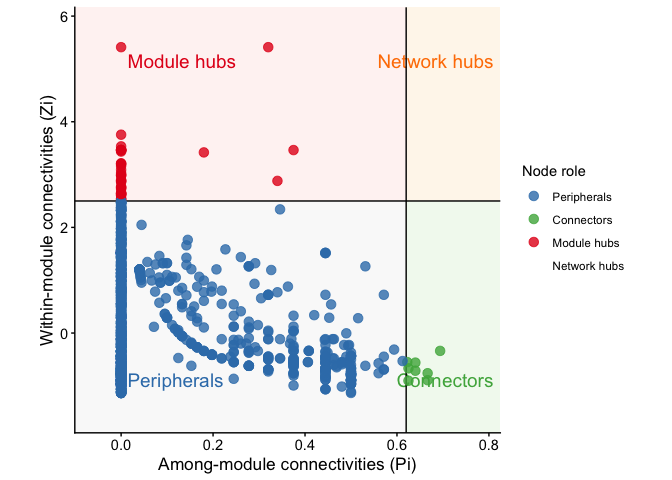
Example9: RMT threshold
# ---- RMT threshold scan #1: WGCNA correlation backend ----
# `ggNetView_RMT()` scans a series of candidate |r| thresholds, builds the
# thresholded correlation matrix at each, computes its eigenvalue spacing
# distribution (NNSD), and picks the threshold at which the NNSD transitions
# from Gaussian Orthogonal Ensemble (signal + noise) to Poisson (noise-free,
# modular network) — this is the RMT-recommended cutoff.
out <- ggNetView_RMT(
  mat              = otu_rare_relative, # input matrix (variables x samples)
  transfrom.method = "none",            # already relative-abundance, no extra transform
  method           = "WGCNA",           # use WGCNA::corAndPvalue for correlation
  cor.method       = "pearson",         # Pearson correlation
  unfold.method    = "gaussian",        # Gaussian KDE unfolding of eigenvalues
  bandwidth        = "nrd0",            # KDE bandwidth rule (stats::density default)
  nr.fit.points    = 20,                # support points (only used if unfold.method = "spline")
  discard.outliers = TRUE,              # IQR-trim extreme eigenvalues before unfolding
  discard.zeros    = TRUE,              # drop all-zero rows/cols after thresholding
  min.mat.dim      = 40,                # early-stop if effective dim drops below 40
  max.ev.spacing   = 3,                 # truncate NNSD tail at spacing = 3
  save_plots       = FALSE,             # don't write diagnostic PNGs to disk
  out_dir          = "RMT_plots",       # (only used when save_plots = TRUE)
  verbose          = TRUE,              # print scan progress to console
  seed             = 1115               # fix RNG for reproducibility
)

# The chosen threshold to feed downstream into build_graph_from_mat(r.threshold = ...)
out$chosen_threshold
sessionInfo
sessionInfo()
#> R version 4.6.1 (2026-06-24)
#> Platform: aarch64-apple-darwin23
#> Running under: macOS Tahoe 26.3.1
#>
#> Matrix products: default
#> BLAS:   /Library/Frameworks/R.framework/Versions/4.6/Resources/lib/libRblas.0.dylib
#> LAPACK: /Library/Frameworks/R.framework/Versions/4.6/Resources/lib/libRlapack.dylib;  LAPACK version 3.12.1
#>
#> locale:
#> [1] zh_CN.UTF-8/zh_CN.UTF-8/zh_CN.UTF-8/C/zh_CN.UTF-8/zh_CN.UTF-8
#>
#> time zone: Asia/Shanghai
#> tzcode source: internal
#>
#> attached base packages:
#> [1] stats     graphics  grDevices utils     datasets  methods   base
#>
#> other attached packages:
#> [1] future_1.70.0    ggNetView_0.2.1  ggnewscale_0.5.2 ggplot2_4.0.3
#>
#> loaded via a namespace (and not attached):
#>  [1] tidyselect_1.2.1      psych_2.6.5           WGCNA_1.74
#>  [4] viridisLite_0.4.3     dplyr_1.2.1           farver_2.1.2
#>  [7] viridis_0.6.5         S7_0.2.2              ggraph_2.2.2
#> [10] fastmap_1.2.0         tweenr_2.0.3          digest_0.6.39
#> [13] rpart_4.1.27          lifecycle_1.0.5       cluster_2.1.8.2
#> [16] survival_3.8-6        magrittr_2.0.5        compiler_4.6.1
#> [19] rlang_1.3.0           Hmisc_5.2-6           tools_4.6.1
#> [22] igraph_2.3.3          utf8_1.2.6            yaml_2.3.12
#> [25] data.table_1.18.4     knitr_1.51            FNN_1.1.4.1
#> [28] labeling_0.4.3        graphlayouts_1.2.4    htmlwidgets_1.6.4
#> [31] mnormt_2.1.2          RColorBrewer_1.1-3    withr_3.0.3
#> [34] foreign_0.8-91        purrr_1.2.2           nnet_7.3-20
#> [37] dynamicTreeCut_1.63-1 grid_4.6.1            polyclip_1.10-7
#> [40] preprocessCore_1.74.0 colorspace_2.1-3      fastcluster_1.3.0
#> [43] globals_0.19.1        scales_1.4.0          iterators_1.0.14
#> [46] MASS_7.3-65           dichromat_2.0-0.1     cli_3.6.6
#> [49] rmarkdown_2.31        vegan_2.7-5           generics_0.1.4
#> [52] otel_0.2.0            future.apply_1.20.2   rstudioapi_0.19.0
#> [55] cachem_1.1.0          ggforce_0.5.0         stringr_1.6.0
#> [58] splines_4.6.1         parallel_4.6.1        impute_1.86.0
#> [61] matrixStats_1.5.0     base64enc_0.1-6       vctrs_0.7.3
#> [64] Matrix_1.7-5          ggrepel_0.9.8         Formula_1.2-5
#> [67] htmlTable_2.5.0       listenv_1.0.0         foreach_1.5.2
#> [70] tidyr_1.3.2           parallelly_1.48.0     glue_1.8.1
#> [73] codetools_0.2-20      stringi_1.8.7         gtable_0.3.6
#> [76] tibble_3.3.1          pillar_1.11.1         htmltools_0.5.9
#> [79] R6_2.6.1              doParallel_1.0.17     tidygraph_1.3.1
#> [82] evaluate_1.0.5        lattice_0.22-9        backports_1.5.1
#> [85] memoise_2.0.1         Rcpp_1.1.2            permute_0.9-10
#> [88] gridExtra_2.3.1       nlme_3.1-169          checkmate_2.3.4
#> [91] mgcv_1.9-4            xfun_0.60             pkgconfig_2.0.3